 TECH GUIDESConvert XLS to XLSX Online Free — Upgrade Old Excel Files in SecondsFlipFileZone · Read Fullopen_in_new
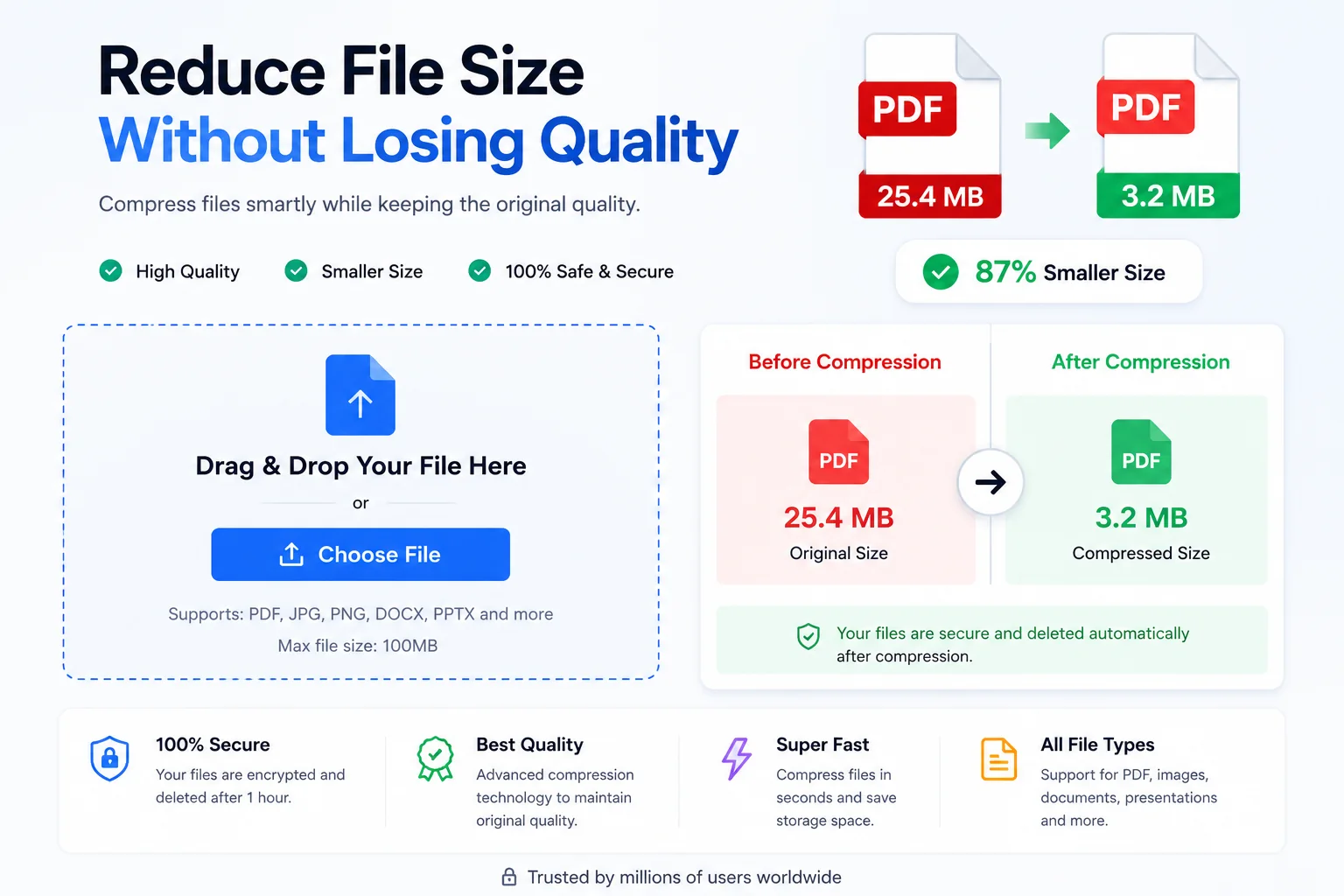
Compress PDF Online Free — Reduce File Size Without Losing Quality
Compress PDF files free in seconds with FlipFileZone. No sign-up, no watermarks — shrink large PDFs for email, upload, or sharing instantly.
FlipFileZone · TECH GUIDES
shareShare this post






Compress PDF Online Free — Reduce File Size Without Losing Quality
Have you ever tried to email an important PDF — a contract, a portfolio, a scanned report — only to get bounced back with a "file too large" error? Or spent minutes watching a progress bar crawl while uploading a presentation to a client portal that caps uploads at 5 MB? You spent time creating that document. The last thing you need is the file size getting in the way of it reaching the right person.
Large PDFs are one of the most common friction points in modern work. Scanned documents, image-heavy reports, and design portfolios routinely balloon to 20, 50, or even 100+ MB. Email providers cap attachments at 25 MB. Many job application portals enforce 2–5 MB limits. Government and legal submission platforms often restrict uploads to single-digit megabytes. A file that won't upload is a file that doesn't get seen.
The solution is fast, free, and requires no technical skill: compress your PDF online before you send it. This guide covers everything — how PDF compression works, what gets preserved, and how to shrink any PDF in under 30 seconds using FlipFileZone's free PDF compressor. No account. No watermarks. No software to install.
Whether you are a student hitting a submission size cap, a professional sharing large decks, or a small business owner emailing invoices daily, this tool was built for you.
⚡ Quick Answer
— Visit flipfilezone.com/compress-pdf, upload your PDF, click Compress PDF, and download your smaller file in seconds. Free, private, and completely watermark-free.
PDF Compression — What Actually Changes (and What Doesn't)
PDF compression works by identifying and eliminating redundant data inside the file. A typical large PDF contains high-resolution images encoded at far more detail than a screen or printer ever needs, embedded font subsets duplicated across pages, and metadata overhead that adds size without adding value. A good compressor strips the excess while leaving the visual output intact.
There are two types of PDF compression: lossless (removes structural redundancy with zero quality change) and lossy (downsamples images to a smaller resolution, which is imperceptible at normal viewing sizes). FlipFileZone applies intelligent compression that targets image data — the dominant source of PDF bloat — while preserving text sharpness, vector graphics, hyperlinks, and document structure. The result is a file that looks identical on screen but takes up a fraction of the storage and transfer footprint.
What changes: file size, often dramatically. What stays the same: your text, your layout, your links, your page order, and the visual fidelity of images at standard viewing and print sizes. A 20 MB scanned report routinely compresses to under 3 MB — small enough to email, upload, or share instantly.
Top Reasons Professionals Choose to Compress PDF Files
- Email attachment limits — Gmail, Outlook, and Yahoo all cap attachments at 25 MB or less. Compressing your PDF ensures it goes through the first time, every time.
- Faster uploads and downloads — Smaller files move faster on any connection, especially on mobile data or slow office Wi-Fi.
- Portal and form submission limits — Job boards, government portals, university submission systems, and legal platforms routinely enforce strict upload caps that compressed PDFs easily clear.
- Cloud storage savings — Storing hundreds of large PDFs in Google Drive or Dropbox eats through your quota. Compressed archives use a fraction of the space.
- Faster website load times — PDFs embedded in or linked from websites load faster for visitors when optimized, reducing bounce rates and improving user experience.
- Reduced printing costs — Smaller, optimized files process faster through networked printers and produce fewer print queue errors in enterprise environments.
- Professional file hygiene — Sending lean, optimized documents signals technical competence and consideration for the recipient's bandwidth and storage.
- Mobile sharing — Sharing PDFs via WhatsApp, Telegram, or iMessage is painless when files are under 10 MB — a threshold most compressed PDFs easily meet.
Compress PDF in Under 60 Seconds — Here's How
Step 1 — Open the FlipFileZone PDF Compressor
Navigate to flipfilezone.com/compress in any browser — Chrome, Safari, Firefox, Edge, or your phone's default browser. The tool loads immediately with no pop-ups, no cookie walls demanding your email, and no upsell screens blocking your path.
Step 2 — Upload Your PDF
Click the upload zone or drag and drop your PDF directly onto the page. FlipFileZone accepts PDFs of any size and any origin — scanned documents, exported reports, design files saved as PDFs, or files downloaded from the web. Your upload is encrypted in transit via HTTPS, so sensitive documents are protected from the moment you click upload.
Step 3 — Click "Compress PDF"
Hit the Compress PDF button and let the engine do its work. The compressor analyses your file's content mix — image density, embedded fonts, metadata weight — and applies the optimal reduction strategy automatically. Most files are fully processed in under 15 seconds, even large, image-heavy PDFs that run to dozens of pages.
Step 4 — Download Your Compressed PDF
Click the download button to save your optimized PDF. The filename is preserved so your file management stays clean. Open the file and you will find the content visually identical to the original — just dramatically smaller. FlipFileZone automatically deletes your uploaded and output files from its servers after the session ends.
✅ Pro Tip
— If your PDF is mostly scanned images (a signed contract or a photocopied document), you will see the biggest size reductions — often 70–85%. For text-only PDFs already generated digitally, reductions are typically 20–40% since there is less image data to compress. Either way, every megabyte saved matters.
Will Your Content Survive Compression? Yes — Here's Why
The biggest fear around PDF compression is degrading a document that took hours to create or scan. FlipFileZone's compressor is tuned to be aggressive on file size and gentle on visual quality. Here is what is preserved after compression:
- All text content — Every word, number, and character remains fully intact, sharp, and selectable in the compressed output.
- Hyperlinks and bookmarks — Clickable links, internal document bookmarks, and table-of-contents navigation all remain functional.
- Page order and layout — Page sequence, margins, column structures, and overall document architecture are untouched.
- Vector graphics and icons — Logos, charts, diagrams, and line-art drawn as vectors are resolution-independent and survive compression perfectly.
- Color accuracy — Image colors are compressed efficiently without visible shifts in hue, saturation, or contrast at normal viewing sizes.
- Form fields — Interactive PDF forms with fillable fields, checkboxes, and dropdowns remain fully functional after compression.
- Digital signatures — Where present, embedded digital signatures and certificate data are preserved in the compressed file.
- Embedded fonts — Font subsets embedded in the PDF remain intact so the document renders correctly on any device, even without the original font installed.
Need the Full PDF Toolkit? FlipFileZone Does That Too
Compression is often just one step in a larger document workflow. If you need to combine several compressed PDFs into a single deliverable, FlipFileZone's free PDF merger lets you drag in multiple files and produce one clean, unified document in seconds.
Every tool in the FlipFileZone suite operates on the same principles: free, browser-based, no account required, and no watermarks on output. You can compress, merge, split, and convert in a single session without ever creating a login or handing over an email address. It is a complete PDF workflow available to anyone with a browser.
Before You Compress — 7 Things That Make Your Output Look Flawless
- Flatten annotations first — If your PDF has comment bubbles or sticky notes you want preserved visually, flatten them in your PDF editor before compressing, so they are baked into the page content.
- Remove unnecessary pages — Delete blank pages or placeholder pages before uploading. Fewer pages means a faster compression and a cleaner output file.
- Check for duplicate embedded fonts — Some PDFs generated by design software embed the same font multiple times. Running compression removes this redundancy automatically.
- Avoid compressing an already-compressed PDF — Running a compressed PDF through the compressor a second time yields minimal gains and can occasionally cause minor quality loss. Start with the original wherever possible.
- Use the original export, not a screenshot — If you are compressing a PDF you created from a Word or PowerPoint file, always use the direct export rather than a screenshotted or printed-to-PDF version, which is already lossy.
- Confirm the output looks right — After downloading, open the compressed PDF and scroll through a few pages to verify the visual quality meets your needs before sending.
- Compress before merging — If you are combining multiple large PDFs, compress each one individually first, then merge. This produces the smallest possible combined output.
Who Uses a PDF Compressor?
Students & Academic Submitters
University portals and online learning systems frequently impose strict file size limits — 5 MB or less is common for assignment submissions. A scanned lab notebook or a graphics-rich design project can easily exceed that limit. Compressing before uploading guarantees the file clears the cap without the last-minute panic of a failed submission.
Corporate Teams & Client-Facing Professionals
Account managers, consultants, and sales teams regularly send proposals, pitch decks, and reports to clients. A 40 MB PDF sitting in someone's inbox is an inconvenience; a 3 MB PDF that opens instantly on a phone during a commute is a professional touch that gets noticed. Compressed deliverables reflect well on the sender.
Legal, Compliance & HR Departments
Legal teams deal in scanned contracts, court filings, and compliance packages that can run to hundreds of pages. Many court e-filing systems and regulatory portals enforce hard file size limits. HR departments uploading employee records, policy documents, and onboarding packets to HRIS platforms face the same constraints. A reliable compressor is a daily-use tool in these environments.
Freelance Writers, Bloggers & Digital Creators
Photographers delivering proofs, designers sending portfolio PDFs, and bloggers distributing lead-magnet ebooks all need files that are small enough to email, host, or offer as downloads without bloating their server bandwidth. A compressed portfolio PDF that loads in two seconds makes a stronger impression than a beautiful-but-sluggish 80 MB file.
Entrepreneurs & Small Business Owners
Invoices, brochures, product catalogs, and service menus are shared dozens of times a month in a typical small business. Keeping those files lean reduces email bounce rates, speeds up client downloads, and lowers the storage footprint on shared drives. For businesses that email PDFs daily, compression is a small habit with compounding efficiency gains over time.
FlipFileZone vs. Other PDF Compression Tools
| Feature | FlipFileZone | Smallpdf | iLovePDF | Adobe Acrobat Online |
|---|---|---|---|---|
| Free to use | ✅ Always | ⚠️ 2 tasks/day | ⚠️ Limited free | ⚠️ Limited free |
| No account needed | ✅ Yes | ❌ Required for more | ❌ Required for more | ❌ Required |
| Files deleted after use | ✅ Auto-deleted | ⚠️ Stored temporarily | ⚠️ Stored temporarily | ⚠️ Stored temporarily |
| No watermarks | ✅ Never | ❌ On free tier | ✅ No watermark | ❌ On free tier |
| Works on mobile | ✅ Yes | ✅ Yes | ✅ Yes | ✅ Yes |
| Batch conversion | ✅ Yes | ❌ Paid only | ❌ Paid only | ❌ Paid only |
Got Questions About Compressing PDFs? We Have Answers
| Is FlipFileZone's PDF compressor really free?Yes — 100% free with no usage limits, no trial periods, and no hidden fees. Every compression you run is free, every time, for every user. |
| How much will my PDF shrink?It depends on the content. Image-heavy and scanned PDFs typically shrink by 60–85%. Text-only or already-optimized PDFs see reductions of 20–40%. The compressor always targets the maximum safe reduction for your specific file. |
| Will compression reduce the visual quality of my PDF?Not noticeably. FlipFileZone's compressor targets image data at a quality threshold that is imperceptible at normal screen viewing and standard print sizes. Text and vector graphics are never degraded. |
| Is my PDF safe when I upload it?Yes. All uploads are encrypted via HTTPS, and your files are permanently deleted from FlipFileZone's servers automatically after your session. Your documents are never shared, stored, or accessed for any other purpose. |
| Can I compress a password-protected PDF?Password-protected PDFs need to be unlocked before compression. If you have the password, open the PDF in your viewer, remove the password protection, save a new copy, and then upload that copy for compression. |
| Can I compress multiple PDFs at once?Yes — FlipFileZone supports batch compression, so you can process multiple PDFs in a single session without repeating the upload process for each file individually. |
| Does it work on my phone or tablet?Absolutely. FlipFileZone is fully mobile-responsive and works on iPhone, Android, and tablet browsers. Upload directly from your device's files app and download the compressed PDF to your phone in seconds. |
| What is the maximum file size I can upload?FlipFileZone handles large PDFs. Most files — even those in the 50–100 MB range — compress without issue. If you are working with exceptionally large files, a stable internet connection will speed up the upload step. |
A PDF that is too large to send is a PDF that does not do its job. Whether it is a scanned contract stalling an email send, a portfolio PDF that bounces off an upload portal, or an invoice clogging a client's inbox — oversized files create friction at exactly the wrong moment. PDF compression removes that friction permanently.
FlipFileZone's compressor handles the technical work in seconds and gives you back a file that is lean, clean, and ready to go anywhere. No software to install, no account to create, no watermark to crop out of your professional document. Just a smaller PDF that reaches its destination without obstacles.
And once your files are compressed, the rest of your PDF workflow is covered too. Merge several compressed PDFs into one clean package, split a large file into individual sections, or convert a PDF back into an editable Word document — all free, all in your browser, all on FlipFileZone.
🚀 Ready to Compress PDF?
— Try FlipFileZone Now!Visit flipfilezone.com/compress-pdf and reduce your PDF file size free — no account needed, no software to install, no watermarks ever.
More Free Tools on FlipFileZone
- Merge PDF — Combine multiple PDFs into one unified document in seconds, no sign-up required.
- Word to PDF Converter — Convert any .doc or .docx file to a perfectly formatted PDF for free.
- PDF to Word Converter — Turn any PDF into a fully editable Word document in seconds.
- JPG to PDF Converter — Convert one or more images into a single professional PDF file instantly.
tagTags
shareShare this post
recommendYou may also like
TECH GUIDESConvert XLS to XLSX Online Free — Upgrade Old Excel Files in SecondsFlipFileZone · Read Fullopen_in_new TECH GUIDESConvert PNG to ICO Online Free — Create Favicons and Windows Icons in SecondsFlipFileZone · Read Fullopen_in_new
 TECH GUIDESConvert Markdown to PDF Online Free — Turn .md Files Into PDF in SecondsFlipFileZone · Read Fullopen_in_new
 TECH GUIDESConvert SVG to PNG Online Free — Export Vector Graphics as Images in SecondsFlipFileZone · Read Fullopen_in_new
 TECH GUIDESConvert GIF to MP4 Online Free — Turn Animated GIFs Into Video in SecondsFlipFileZone · Read Fullopen_in_new
 TECH GUIDESConvert WAV to MP3 Online Free — Compress Audio Files in SecondsFlipFileZone · Read Fullopen_in_new
 TECH GUIDESConvert MOV to MP4 Online Free — Convert iPhone Videos in SecondsFlipFileZone · Read Fullopen_in_new
chatPost a comment
Comments
0