 TECH GUIDESConvert XLS to XLSX Online Free — Upgrade Old Excel Files in SecondsFlipFileZone · Read Fullopen_in_new
Control Light Color Temperature by Voice: Google Home’s New Kelvin Feature
Google Home now lets you set smart‑bulb color temperature in kelvin with a simple voice command, bringing precise lighting control to any room.
FlipFileZone · TECH GUIDES
shareShare this post


Control Light Color Temperature by Voice: Google Home’s New Kelvin Feature
Why Precise Color Temperature Matters
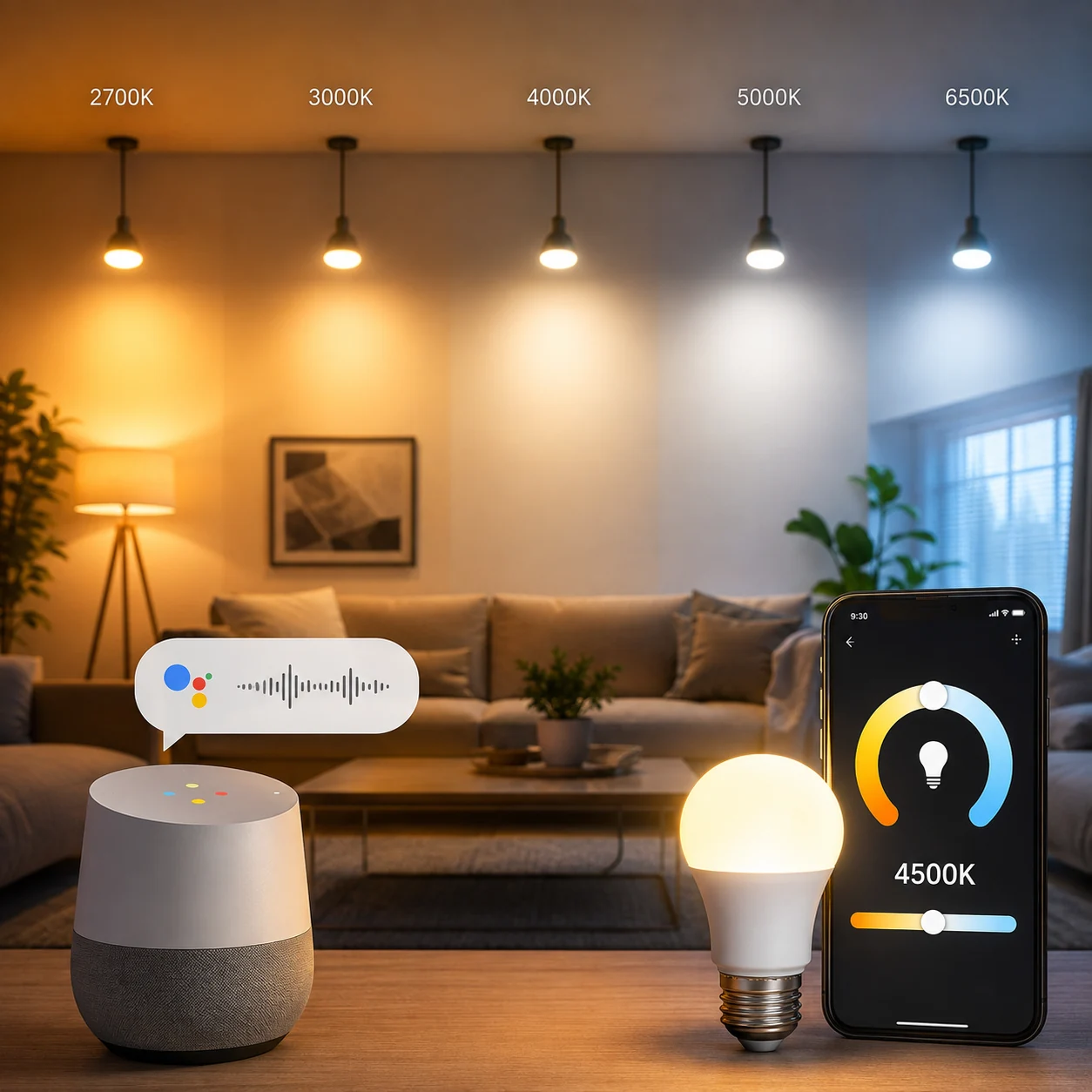
Lighting designers have long used kelvin values to describe the warmth or coolness of a light source. A 2700 K bulb mimics a cozy fireplace, while 6500 K replicates daylight. Homeowners who rely on smart lighting often settle for vague descriptors like “warm white” or “cool white,” missing the nuance that can affect mood, productivity, and even circadian rhythm.
Google Home’s latest firmware update bridges that gap by exposing kelvin control through voice. Users can now say, “Hey Google, set the living‑room lights to 4000 kelvin,” and the assistant translates the request into an exact color temperature command for compatible bulbs.
The change matters because it removes the guesswork of scrolling through app sliders. When you ask for a specific kelvin value, the system bypasses the subjective “warm” or “cool” labels and delivers a measurable output that matches scientific lighting standards.
✦✦✦
How the Feature Works Under the Hood
Google’s smart‑home stack relies on the Matter protocol to communicate with third‑party bulbs. The new update adds a kelvin‑specific attribute to the Matter lighting cluster, allowing the Google Assistant to send a precise temperature value instead of a generic hue‑saturation pair.
When you utter a command, the Assistant parses the numeric kelvin token, validates it against the supported range of the connected device (usually 2000 K‑6500 K), and constructs a Matter “setColorTemperature” call. The bulb receives the command, adjusts its LED driver, and reports back the new temperature, which the Assistant confirms verbally.
Because the interaction stays within the Matter ecosystem, latency is minimal—typically under 300 ms from voice detection to light change. Users with legacy Zigbee or Wi‑Fi bulbs that lack Matter support will not see the kelvin option, but Google’s update also adds a fallback conversion that maps kelvin values to the nearest hue‑saturation setting for those devices.
✦✦✦
Setting Up Voice Kelvin Control
First, ensure your Google Home app is updated to version 2026.8.1 or later. Open the app, navigate to Settings → Devices, and select a light that supports Matter. A new “Color Temperature (Kelvin)” toggle appears; enable it and optionally set a default range.
Next, teach the Assistant the phrasing you prefer. In the Home app, tap “Add voice command,” speak a sample like “Set the kitchen lights to 3500 kelvin,” and confirm. Google stores the pattern, so future requests follow the same path without extra configuration.
If you have multiple bulbs in a group, the command applies the kelvin value uniformly, preserving consistency across the zone. For mixed‑type groups, the system automatically selects the nearest supported temperature for each bulb, preventing flicker or error messages.
✦✦✦
Practical Use Cases at Home
Morning routines benefit from cooler temperatures that signal alertness. A simple “Hey Google, set the bedroom lights to 5000 kelvin” can simulate sunrise, helping the body’s internal clock wake up naturally.
Evening relaxation calls for warmer tones. Saying “Set the living‑room lights to 2700 kelvin” creates a soft ambience that reduces blue‑light exposure, supporting melatonin production before sleep.
Home offices can fine‑tune lighting for tasks that demand visual acuity. A value around 4200 kelvin offers a neutral white that reduces eye strain during long spreadsheet sessions.
Entertainers can choreograph lighting scenes that shift gradually from 3000 kelvin to 6000 kelvin as a party progresses, all triggered by a single voice command.
✦✦✦
Compatibility Landscape
Major manufacturers such as Philips Hue, LIFX, and Nanoleaf have released Matter‑enabled firmware that respects kelvin commands. Older models that only expose a generic “white” mode will still appear in the Google Home app but without the numeric slider.
For users invested in ecosystems like Apple HomeKit, the kelvin value translates through HomeKit’s “colorTemperature” characteristic, meaning the same voice command works across platforms when a Google Nest Hub shares control.
DIY enthusiasts building custom LED strips with ESPHome can expose a Matter endpoint that accepts kelvin values, unlocking the same voice control without purchasing commercial bulbs.
✦✦✦
Potential Pitfalls and How to Avoid Them
Not all bulbs support the full 2000‑6500 K spectrum. Some budget LEDs cap at 3500 K, so a request for 6000 K will default to the highest available temperature, which can feel inconsistent if you mix brands.
Voice recognition errors may misinterpret numbers, especially in noisy environments. Training the Assistant by repeating the command a few times helps the speech model learn your pronunciation of “kelvin.”
Network latency can cause a brief lag when multiple bulbs update simultaneously. Placing the Nest Hub on a wired Ethernet connection or a strong Wi‑Fi band reduces this effect.
If you rely on routines that chain several actions, ensure the kelvin command precedes any dimming steps; otherwise the system may overwrite the temperature with a default value.
✦✦✦
Future Directions for Voice‑Controlled Lighting
Google’s kelvin integration hints at deeper environmental awareness. Upcoming releases may tie temperature adjustments to ambient light sensors, automatically shifting toward cooler tones when daylight wanes.
Developers could expose APIs that map mood keywords—like “focus” or “relax”—to curated kelvin values, letting users speak emotions instead of numbers.
Integration with health platforms may soon allow circadian‑aligned lighting schedules that sync with sleep‑tracking data, creating a holistic wellness loop controlled entirely by voice.
As more devices adopt Matter, the kelvin standard will become a universal lingua franca for lighting, reducing fragmentation and giving consumers a consistent experience across brands.
For power users, the ability to script kelvin changes via Google Assistant’s Routines or the new Home Graph API opens the door to complex lighting automations that respond to calendar events, weather forecasts, or even stock market alerts.
shareShare this post
recommendYou may also like
TECH GUIDESConvert XLS to XLSX Online Free — Upgrade Old Excel Files in SecondsFlipFileZone · Read Fullopen_in_new TECH GUIDESConvert PNG to ICO Online Free — Create Favicons and Windows Icons in SecondsFlipFileZone · Read Fullopen_in_new
 TECH GUIDESConvert Markdown to PDF Online Free — Turn .md Files Into PDF in SecondsFlipFileZone · Read Fullopen_in_new
 TECH GUIDESConvert SVG to PNG Online Free — Export Vector Graphics as Images in SecondsFlipFileZone · Read Fullopen_in_new
 TECH GUIDESConvert GIF to MP4 Online Free — Turn Animated GIFs Into Video in SecondsFlipFileZone · Read Fullopen_in_new
 TECH GUIDESConvert WAV to MP3 Online Free — Compress Audio Files in SecondsFlipFileZone · Read Fullopen_in_new
 TECH GUIDESConvert MOV to MP4 Online Free — Convert iPhone Videos in SecondsFlipFileZone · Read Fullopen_in_new
chatPost a comment
Comments
0