 TECH GUIDESConvert XLS to XLSX Online Free — Upgrade Old Excel Files in SecondsFlipFileZone · Read Fullopen_in_new
Convert PNG to WebP Online Free — Reduce Image Size for Faster Websites
Convert PNG to WebP free with FlipFileZone. Turn any PNG image into a smaller, web-optimised WebP file instantly — no sign-up, no watermarks, no software needed.
FlipFileZone · TECH GUIDES
shareShare this post


Convert PNG to WebP Online Free — Reduce Image Size for Faster Websites
Your website scores well on content and design but fails on page speed. You run a Lighthouse audit and the top recommendation is always the same: serve images in next-generation formats. Specifically, convert your PNG and JPG images to WebP. A developer on a tight deadline needs to convert a folder of PNG assets to WebP before pushing a performance update. A blogger trying to improve SEO rankings knows that image format is a measurable factor in Core Web Vitals scores and wants to start serving WebP instead of PNG across their site.
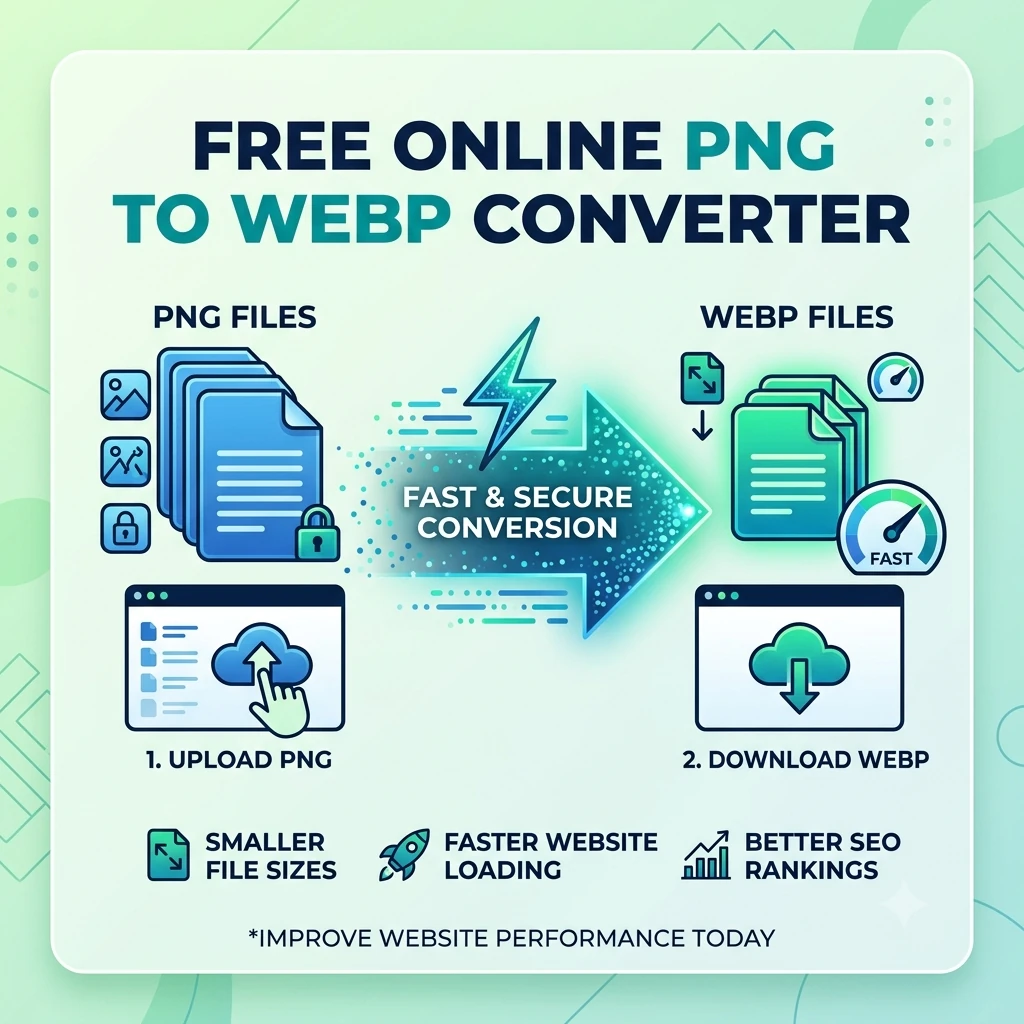
WebP is the modern image format built for the web. Developed by Google and now supported natively in every major browser, WebP produces files that are consistently 25 to 35 percent smaller than equivalent PNGs at the same visual quality — and it does this while still supporting transparency. For web images, that size reduction translates directly into faster load times, lower bandwidth costs, better Lighthouse scores, and improved search ranking through Core Web Vitals.
FlipFileZone's free PNG to WebP converter handles the conversion in seconds. Upload your PNG, convert to WebP, and download a smaller, web-ready image that loads faster in every modern browser. No account. No watermark. No file stored on any server after your session ends.
⚡ Quick Answer
— Visit flipfilezone.com/png-to-webp, upload your PNG file, click Convert to WebP, and download your optimised image instantly. Free, private, and watermark-free.
Why WebP Is the Right Format for Web Images
PNG was designed as a lossless image format for general-purpose use — not specifically for web delivery. It is excellent at preserving image quality and supporting transparency, but it was not built with file size efficiency for web transmission as its primary goal. A large, complex PNG can be multiple megabytes, and serving those files at scale — across thousands of page loads per day — creates measurable performance costs in bandwidth, load time, and user experience.
WebP was built specifically to address this. Google developed WebP to deliver smaller file sizes than both JPG and PNG at equivalent visual quality, using modern compression algorithms that PNG's older specification cannot match. WebP supports both lossy and lossless compression modes, and it supports full alpha channel transparency — meaning it can replace PNG in every use case where transparency is required, not just in photographic contexts where JPG is an alternative.
The practical outcome for web developers and site owners: switching from PNG to WebP for web-served images typically reduces image payload by 25 to 50 percent with no visible quality difference to users. Faster pages rank better in Google Search, convert better in e-commerce, and retain more visitors before they bounce. Converting PNG assets to WebP is one of the highest-impact, lowest-effort performance improvements available to any website.
Top Reasons Developers and Site Owners Convert PNG to WebP
- Faster page load times — Smaller image files download faster on every connection speed. Converting PNG to WebP reduces image payload by 25 to 50 percent, directly cutting time to first contentful paint and overall page load time.
- Better Core Web Vitals scores — Google uses Core Web Vitals as a ranking signal. Largest Contentful Paint (LCP) — one of the three core metrics — is heavily influenced by image size. Converting hero images and large graphics from PNG to WebP improves LCP scores measurably.
- Lower bandwidth costs — High-traffic websites serving millions of images per month pay real money for CDN bandwidth. Reducing image file sizes by 30 to 50 percent through WebP conversion produces proportional savings in hosting and CDN costs at scale.
- Pass Lighthouse audits — Google Lighthouse's performance audit flags PNG images as opportunities and specifically recommends WebP as the next-generation format. Converting PNG to WebP resolves these audit warnings and improves the overall performance score.
- Transparency support maintained — Unlike JPG, WebP supports alpha channel transparency, so logo files and graphics with transparent backgrounds convert from PNG to WebP without losing the transparency layer.
- Universal browser support — All major browsers — Chrome, Firefox, Safari, Edge, and their mobile equivalents — have supported WebP since 2020. Serving WebP is now a safe, universal choice for all web contexts.
- Reduce storage footprint — Image libraries stored in cloud storage or on-server directories shrink significantly when PNG files are replaced with WebP equivalents, reducing storage costs and backup transfer times.
- Improve e-commerce conversion rates — Faster product image loading on mobile correlates directly with lower cart abandonment and higher conversion rates in e-commerce research. Converting product PNG images to WebP is a measurable conversion rate optimisation step.
How to Convert PNG to WebP — Step by Step
Step 1 — Open the FlipFileZone PNG to WebP Converter
Navigate to flipfilezone.com/png-to-webp in any browser on any device. No account creation, no subscription prompt, no onboarding flow. The converter is ready immediately when the page loads.
Step 2 — Upload Your PNG File
Click the upload area or drag and drop your PNG image onto the page. FlipFileZone accepts PNG files of any size — icons, logos, screenshots, illustrations, UI assets, product images, or any other PNG from any source. All uploads travel over an encrypted HTTPS connection.
Step 3 — Click Convert to WebP
Hit the Convert to WebP button. FlipFileZone encodes your PNG as a WebP file using high-quality compression settings that produce a meaningfully smaller output while preserving the visual quality of the original. If the source PNG contains alpha channel transparency, it is preserved in the WebP output. Processing completes in seconds.
Step 4 — Download Your WebP File
Click the download button to save your converted .webp file. Open it in a modern browser to verify the quality and transparency before deploying it to your website or application. FlipFileZone permanently and automatically deletes your uploaded PNG and the converted WebP from its servers once your session ends.
✓ Pro Tip
— After converting your PNG assets to WebP, implement a fallback strategy on your website for any users still on unsupported browsers — though this is increasingly rare, as all major browsers have supported WebP since 2020. In HTML, use a picture element with a WebP source and a PNG fallback: this serves WebP to modern browsers and PNG to any legacy browser automatically, giving you the performance benefits of WebP without sacrificing compatibility for the small percentage of users on very old software.
How Much Smaller Will the WebP Be?
WebP consistently outperforms PNG on file size across all image types. Here are realistic expectations by content category:
- Photographs and complex images — PNG photographs converted to WebP typically see size reductions of 35 to 55 percent. A 2 MB product photograph PNG commonly converts to a 900 KB to 1.3 MB WebP with no visible quality difference at standard viewing sizes.
- Logos and flat-colour graphics with transparency — Simple flat-colour logos and icons with transparent backgrounds convert with reductions of 20 to 40 percent. The simpler the image content, the more efficiently WebP's compression operates.
- UI screenshots and interface graphics — Screenshots and interface captures convert with reductions of 25 to 45 percent, depending on the complexity of the UI elements and the amount of text content in the image.
- Illustrated and graphic-design content — Complex illustrations with many colours and gradients see reductions of 30 to 50 percent. The file size savings compound across a full page or product catalogue at scale.
Common Use Cases — When PNG to WebP Conversion Makes a Real Difference
Web Developers Running Performance Optimisations
A developer tasked with improving a site's Lighthouse performance score identifies image format as the highest-impact opportunity. The site serves several hundred PNG images across product pages, blog posts, and landing pages. Converting the PNG image library to WebP and updating the img tags or CDN delivery configuration is typically the single change that produces the largest measurable improvement in LCP scores and overall performance grade — faster than minifying JavaScript or optimising fonts.
WordPress and CMS Site Owners
A WordPress site owner uploading product images, blog post featured images, and page graphics in PNG format is serving unnecessarily large files to every visitor. Converting PNG uploads to WebP before uploading — or using a plugin that auto-converts on upload — reduces the total image payload served to visitors by 30 to 50 percent. For sites running on shared hosting where server resources and bandwidth are constrained, this reduction has a direct positive impact on page load speed and monthly bandwidth usage.
E-commerce Merchants
An online store with 500 product listings, each with 4 to 6 product images served as PNGs, is carrying significant image payload on every category page and product detail page. Converting product image PNGs to WebP reduces per-page image payload proportionally. On mobile connections — where the majority of e-commerce traffic now occurs — the resulting page speed improvement measurably reduces bounce rate and cart abandonment, producing a direct return on the time invested in format conversion.
Digital Agencies and Freelance Developers
An agency delivering a website build to a client includes a performance optimisation pass as part of the delivery standard. Converting all PNG assets in the design handoff to WebP before site launch ensures the delivered site scores well on Lighthouse from day one, without requiring a separate performance remediation engagement after the client notices slow page speeds in Google Search Console.
Content Teams and Bloggers
A blogger publishing multiple posts per week and uploading PNG images for every article is accumulating a large library of large image files. Converting to WebP before upload — or running a batch conversion on the existing image library — reduces the storage footprint and ensures every page on the site benefits from faster image loading for search ranking purposes.
FlipFileZone vs Other PNG to WebP Tools
| Feature | FlipFileZone | Squoosh | CloudConvert | Convertio |
|---|---|---|---|---|
| Free to use | ✓ Always | ✓ Yes | ⚠ Limited free | ⚠ Limited free |
| No account needed | ✓ Yes | ✓ Yes | ✗ Required for more | ✓ Yes |
| Files deleted after use | ✓ Auto-deleted | ✓ Local only | ⚠ Stored temporarily | ⚠ Stored temporarily |
| Preserves transparency | ✓ Yes | ✓ Yes | ✓ Yes | ✓ Yes |
| No watermarks | ✓ Never | ✓ No watermark | ✓ No watermark | ✓ No watermark |
| Part of full file toolkit | ✓ Yes | ✗ Image only | ⚠ Partial | ⚠ Partial |
Frequently Asked Questions
| Is FlipFileZone's PNG to WebP converter really free? |
| Yes — completely free with no usage limits, no trial periods, and no subscription required. Convert as many PNG files as you need, whenever you need, at zero cost. |
| Will converting PNG to WebP noticeably reduce image quality? |
| Not at high quality settings. WebP's compression is designed to be perceptually transparent at standard quality levels — the output looks the same as the PNG source at normal viewing sizes while being significantly smaller in file size. |
| Is WebP supported in all browsers? |
| Yes. All major browsers — Chrome, Firefox, Safari (since version 14), Edge, and their mobile equivalents — have supported WebP since 2020. WebP is now a safe, universal choice for web image delivery across all modern browsers. |
| Will transparent areas in my PNG be preserved in the WebP? |
| Yes. Alpha channel transparency in PNG images is fully preserved in the WebP output. Logos, icons, and graphics with transparent backgrounds convert cleanly from PNG to WebP without losing the transparency layer. |
| Are my files safe when I upload them? |
| Yes. All uploads are encrypted via HTTPS. Your PNG and the converted WebP are permanently and automatically deleted from FlipFileZone servers once your session ends. Your files are never stored, shared, or accessed for any other purpose. |
| Can I convert multiple PNG files at once? |
| Yes. FlipFileZone supports batch conversion — upload and convert multiple PNG images in a single session without repeating the process for each file individually. |
| What if I need to convert the WebP back to PNG later? |
| Use FlipFileZone's free WebP to PNG converter to switch back whenever you need lossless quality or non-web compatibility. Both directions are free and account-free. |
| Does it work on mobile? |
| Yes. FlipFileZone is fully mobile-responsive. Open the converter in your phone browser, upload a PNG from your files app, and download the converted WebP directly to your device — no app installation required. |
Every PNG image on your website that could be a WebP is a missed opportunity for a faster page, a better Core Web Vitals score, and lower bandwidth costs. The conversion is free, takes seconds per file, and the performance benefits are measurable and lasting. There is no technical barrier to converting — the only question is how quickly you want your pages to load.
FlipFileZone makes the conversion instant and free. Upload your PNG, convert, download your WebP. No account, no watermark, no file stored anywhere after your session ends. Just a smaller, web-ready image that loads faster for every visitor on every connection.
And when a WebP needs to come back to PNG for a design workflow, a print job, or a compatibility requirement — FlipFileZone's WebP to PNG converter completes the round trip just as quickly and just as freely.
🚀 Ready to Convert PNG to WebP? Try FlipFileZone Now!
— Visit flipfilezone.com/png-to-webp and convert your PNG images to WebP free — no account needed, no software to install, no watermarks ever.
More Free Tools on FlipFileZone
- WebP to PNG Converter — Convert WebP back to PNG for design tools, print, and non-web workflows.
- WebP to JPG Converter — Convert WebP to JPG for maximum compatibility across all platforms.
- Compress Image — Further reduce image file sizes with lossless compression for even faster pages.
- Image Resizer — Resize images to exact display dimensions before converting to WebP.
- PNG to JPG Converter — Convert PNG to JPG when WebP is not the right destination format.
tagTags
shareShare this post
recommendYou may also like
TECH GUIDESConvert XLS to XLSX Online Free — Upgrade Old Excel Files in SecondsFlipFileZone · Read Fullopen_in_new TECH GUIDESConvert PNG to ICO Online Free — Create Favicons and Windows Icons in SecondsFlipFileZone · Read Fullopen_in_new
 TECH GUIDESConvert Markdown to PDF Online Free — Turn .md Files Into PDF in SecondsFlipFileZone · Read Fullopen_in_new
 TECH GUIDESConvert SVG to PNG Online Free — Export Vector Graphics as Images in SecondsFlipFileZone · Read Fullopen_in_new
 TECH GUIDESConvert GIF to MP4 Online Free — Turn Animated GIFs Into Video in SecondsFlipFileZone · Read Fullopen_in_new
 TECH GUIDESConvert WAV to MP3 Online Free — Compress Audio Files in SecondsFlipFileZone · Read Fullopen_in_new
 TECH GUIDESConvert MOV to MP4 Online Free — Convert iPhone Videos in SecondsFlipFileZone · Read Fullopen_in_new
chatPost a comment
Comments
0